API integration services: the work and what it costs
API integration services explained: what the work covers, payment gateway integration, what drives the cost, a worked estimate and what to ask a vendor.
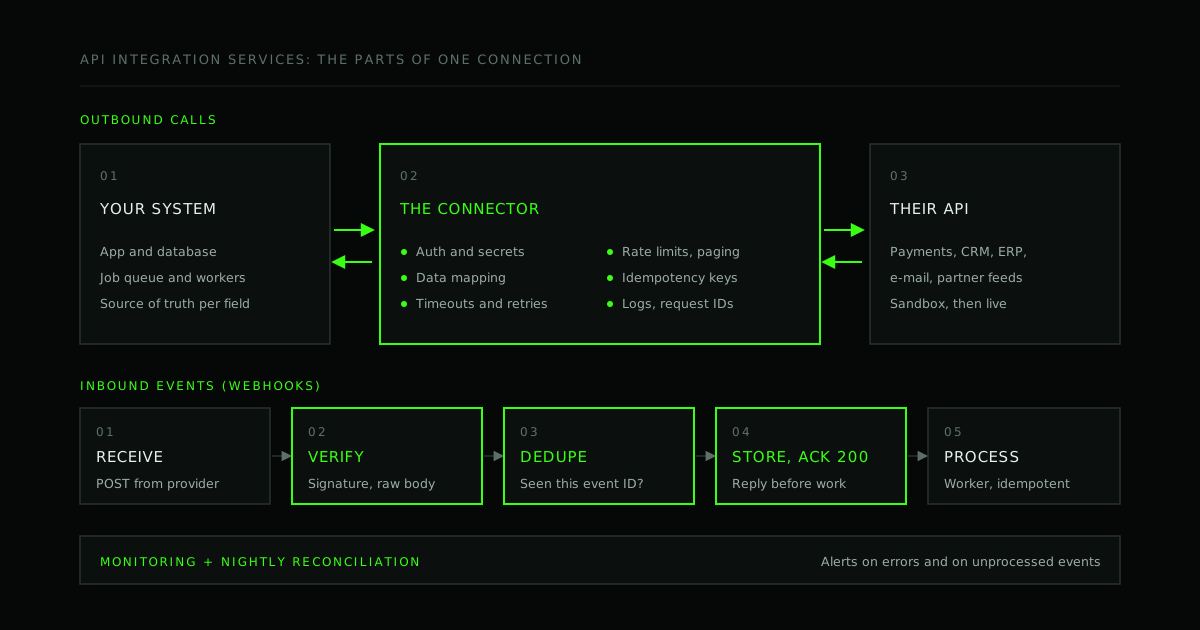
API integration services are the work of connecting your software to another system through that system's API, so that data and actions move between them without anyone retyping them: payments into your orders, contacts into your CRM, invoices into your accounting system. The code that calls the API is the small part. Most of the work, and most of the cost, is in mapping the data, handling authentication, surviving the other system's failures, and noticing when something has gone wrong.
That is why two quotes for "connect our app to X" can differ several times over. This guide sets out what the work involves, what is different about payment gateway integration, what drives the cost, a worked estimate you can copy, and the questions to ask before you hire someone to do it.
What are API integration services?
An API integration is a connection between two systems in which one calls the other's API, or receives its events, to keep data or processes in step. API integration services are the design, build, testing and running of those connections, usually by a development team or agency on your behalf.
There are three common shapes:
- Outbound calls: your system asks the other one to do something or send something. Creating a payment, sending an e-mail, looking up a tax rate.
- Inbound events: the other system tells yours that something happened, usually by webhook (an HTTP request it sends to a URL you give it). A payment succeeded, a contract was signed, a ticket was closed.
- Synchronisation: two systems hold copies of the same records, such as customers or products, and changes on either side must reach the other. This is the hardest of the three, because someone has to decide what happens when both sides change the same record.
It is different from API development, which is building an API of your own for others to call. Many projects need both: an API for your app, and integrations from that API to the services around it. We cover the first in what to specify before you build an API.
What the work involves
An integration that survives production goes through the same steps whichever system it connects to:
- Discovery. Which systems, which records, which direction, how often, and who owns each side. Read the other system's documentation and request sandbox access on day one, because access often takes longer than the code.
- Data mapping. Field by field: where each value comes from, how it is transformed, what happens when it is missing or invalid, and which system is the source of truth for each field. Write it down as a table both sides sign off.
- Authentication and secrets. An API key, OAuth 2.0 with tokens that expire and must be refreshed (RFC 6749), or signed requests. Decide where secrets live, who can see them, and how they are rotated.
- The connector. The client code that calls the API, with timeouts, retries with backoff, idempotency keys on anything that creates or charges, pagination, and respect for rate limits (an HTTP
429response, defined in RFC 6585, means slow down). - Inbound events. A webhook endpoint that verifies each request really came from the provider, ignores repeats, acknowledges quickly and does the slow work in the background.
- Backfill and reconciliation. Loading the records that existed before the integration, and a scheduled job that compares both sides and reports differences, because some events will always be missed.
- Testing. Against the provider's sandbox, including the failure cases: timeouts, rejected payments, duplicate events, expired tokens.
- Monitoring and a runbook. Logs with request IDs, alerts on error rates and on a backlog of unprocessed events, and a short document that says what to do when the alert fires.
- Maintenance. Providers deprecate API versions and change behaviour. Someone has to read their changelog and plan upgrades.
Common types of integration
| Integration | Typical direction | What makes it hard | What to plan for |
|---|---|---|---|
| Payments (card processors, wallets, bank transfers) | Outbound calls plus inbound webhooks | Money moves twice if a retry is not idempotent; events arrive late or out of order | Idempotency keys, verified webhooks, reconciliation against the provider's records |
| CRM and marketing (contacts, leads, deals) | One-way push, sometimes two-way sync | Duplicate contacts, field mapping, two-way conflicts | A clear source of truth per field; matching rules for duplicates |
| ERP and accounting (invoices, stock, orders) | Batch or near-real-time, often two-way | Old or on-premise systems, strict validation, slow access approvals | Early access to a test environment; a place to park records that fail validation |
| Communications (e-mail, SMS, voice, video) | Mostly outbound, with delivery events back | Deliverability, provider limits, per-message cost | Templates, retry rules, delivery status stored against each message |
| Identity and single sign-on | Inbound sign-in, outbound user provisioning | Security mistakes are costly; every customer's set-up differs | Standard protocols, per-customer configuration, tested logout and revocation |
| Partner and data feeds | Inbound files or API pulls | Format drift; missing or late data | Validation at the boundary, alerts on gaps, idempotent imports |
Payment gateway integration: what is different
Payment gateway integration needs the same steps as any other integration, but mistakes cost money, so the edge cases are not optional. Using Stripe's documentation as the example (other providers document similar rules):
- Retries must not charge twice. Stripe accepts an idempotency key on every
POSTrequest in its v1 API, so a request repeated after a network error returns the first result instead of creating a second object. Keys can be removed after they are at least 24 hours old, so a retry days later is treated as a new request (Stripe: idempotent requests). - Webhooks arrive more than once, and out of order. Stripe says an endpoint "might occasionally receive the same event more than once", recommends logging processed event IDs, and does not guarantee delivery order. In live mode it retries a failed delivery for up to three days with exponential backoff (Stripe: webhooks).
- Acknowledge first, work later. The endpoint should return a
2xxbefore any slow logic, or the provider times out and sends the event again. - Verify every webhook. The signature is computed over the raw request body, so the route must not parse or reformat the body before checking it.
- Keep card data off your servers. Using the provider's hosted checkout or hosted card fields means raw card numbers never reach your systems, which keeps down the PCI DSS scope you have to evidence.
A webhook handler in Node.js that follows those rules is short. The event ID becomes the document's _id in MongoDB, so a repeated delivery fails the insert instead of being processed twice:
import express from 'express'
import Stripe from 'stripe'

const stripe = new Stripe(process.env.STRIPE_SECRET_KEY)
const app = express()
// `events` is a MongoDB collection, e.g. db.collection('stripe_events')

// Stripe signs the raw bytes, so this route must not parse JSON first.
app.post('/webhooks/stripe', express.raw({ type: 'application/json' }), async (req, res) => {
  let event
  try {
    event = stripe.webhooks.constructEvent(
      req.body,
      req.get('stripe-signature'),
      process.env.STRIPE_WEBHOOK_SECRET,
    )
  } catch {
    return res.sendStatus(400) // not from Stripe, or the body was altered
  }

  try {
    await events.insertOne({ _id: event.id, type: event.type, payload: event, status: 'pending' })
  } catch (err) {
    // 11000 = duplicate key: this event is already stored. Anything else, let Stripe retry.
    if (err.code !== 11000) return res.sendStatus(500)
  }
  res.sendStatus(200) // acknowledge now; a worker processes 'pending' events
})
The worker that marks orders as paid must also be idempotent on the business effect ("mark paid only if not already paid"), because Stripe notes that in some cases two separate event objects are sent for the same change. The same pattern works for any provider that sends signed webhooks.
What drives the cost of an API integration
The other system decides more of the cost than your own code does. These are the factors that move an estimate, roughly in order of how often they surprise people:
| Factor | Cheaper end | Expensive end |
|---|---|---|
| The other side's API | Modern REST API, good documentation, a sandbox | Old SOAP or file exchange, thin docs, no test environment |
| Access | Self-service keys today | Approval forms, VPNs and weeks of waiting |
| Direction | One-way push | Two-way sync with conflict rules |
| Data mapping | A few fields that match | Many objects, transformations and custom fields per customer |
| Authentication | One API key for your account | OAuth per customer, with token refresh and revocation |
| Volume and limits | Low volume, generous limits | High volume, strict rate limits, a large historic backfill |
| Timing | Nightly batch | Real-time, with webhooks and a queue |
| Failure handling | Retry and alert | Reconciliation, manual review screens, audit trail |
| Stakes | Internal convenience | Money, health data or contracts, with compliance review |
Two costs are easy to forget. Running costs: the provider's own fees (per transaction, per message or per plan tier), plus hosting for the workers and queues. Maintenance: API versions are retired and behaviour changes, so budget some time every year for upgrades. OWASP's API Security Top 10 lists unsafe consumption of third-party APIs as its own risk, which is a good reminder that data from a partner deserves the same validation as data from a user.
A worked estimate you can copy
Break the integration into work items and give each three numbers in person-days: optimistic, most likely and pessimistic. Take a hypothetical booking app that needs a payment provider and a one-way push of customers into a CRM. The days below are invented to show the arithmetic. They are not a benchmark; a real estimate depends on the real systems and scope.
| Work item | Optimistic | Likely | Pessimistic |
|---|---|---|---|
| Discovery, access and data mapping | 1 | 2 | 4 |
| Payments: checkout, webhooks, refunds | 3 | 5 | 9 |
| CRM: one-way customer sync | 2 | 4 | 8 |
| Backfill of existing customers | 1 | 2 | 4 |
| Error handling, reconciliation, alerts | 2 | 3 | 6 |
| Sandbox testing and go-live | 2 | 3 | 5 |
| Total | 11 | 19 | 36 |
A three-point weighted estimate, (optimistic + 4 × likely + pessimistic) ÷ 6 for each line, gives 20.5 person-days. The pessimistic column is wide because of the items you do not control: how fast access is granted, and how well the sandbox matches production.
Cost = days × the blended day rate. Keep the two separate when you compare vendors: the days show whether they understood the systems, the rate shows what their time costs. How to estimate what an app costs walks through the same method for a whole app.
Build it, use an integration platform, or a unified API?
Not every integration needs custom code.
| Option | What it is | Fits when | Watch out for |
|---|---|---|---|
| Workflow tools (Zapier, Make and similar) | No-code automations between popular apps | Low volume, internal workflows, standard apps | Per-task pricing at volume, limited error handling, logic hidden from your codebase |
| Unified API providers | One API that covers many apps in a category, such as many CRMs | Your product must support many tools of the same kind | Coverage of the fields you need, another vendor in the data path |
| Custom integration | Code in your own system, calling the provider's API directly | Money moves, volume is high, logic is specific to your product, or you need full control | You own the maintenance |
A common path is to prove a workflow with a no-code tool, then build it properly once it carries money, volume or customer data.
What to ask before you hire API integration services
- Have you integrated with this system, or one like it, and what went wrong?
- Who requests and holds access to the sandbox and production accounts? (They should be registered under your organisation.)
- How will you handle retries, duplicate events and rate limits?
- What happens to records that fail validation? Where do they go, and who sees them?
- How will we know the integration has stopped working, and how quickly?
- Is there a reconciliation job, and what does it compare?
- What is in the hand-over: source, mapping document, runbook, tests, dashboards?
- Who maintains it when the provider changes its API?
The buyer's guide to choosing a development partner covers the contract terms to settle alongside these, and staff augmentation vs outsourcing helps decide whether to hand the integration over as a project or add an engineer to your own team.
How we approach API integrations at Daniotech
We build APIs and integrations with Node.js: payments and third-party services, webhooks, and connections to systems you already run. We ask for the documentation and a test environment at the start, because integrations usually set the schedule more than features do. We write the data mapping down for you to approve before we build, and the code goes in your repositories, against accounts registered to your organisation.
We work on a fixed price or on time and materials, and you own the code. We do not publish rates; ask for a quote and we will break it down into days by work item, as in the table above, so you can compare it with any other.
Frequently asked questions
How much do API integration services cost? It depends more on the other system than on your code: its documentation, sandbox, authentication, the amount of data mapping, whether sync is one-way or two-way, and how failures must be handled. Estimate it in person-days by work item, then multiply by the vendor's day rate, and add the provider's own fees and yearly maintenance.
How long does an API integration take? A one-way integration with a modern, well-documented API can take days. A two-way sync with an older ERP can take weeks, and much of that time is waiting for access and test environments. Ask for access on day one and plan the schedule around the slowest system, not the code.
What is the difference between API development and API integration? API development is building your own API for other software to call. API integration is connecting your software to someone else's API, or receiving their events. Many products need both: an API for their own apps, and integrations from it to payments, CRM, e-mail and other services.
Should we use Zapier or build a custom integration? Use a workflow tool when volume is low, the apps are standard and a failure is an inconvenience. Build a custom integration when money moves, volume is high, the logic is specific to your product, or you need retries, reconciliation and monitoring you control. Many teams prove the flow with a tool first.
Who maintains an integration after launch? Someone has to, because providers retire API versions and change behaviour. Agree before launch who reads the provider's changelog, who receives the alerts, and how upgrade work is paid for, whether that is your team, the vendor on a support agreement, or a mix.
Where to go from here
If you need your product connected to payments, a CRM, an ERP or a partner's system, see our API development and integration services, or send us the systems, the records that need to move and any documentation you have through the contact page. We will reply with the questions we would ask before estimating it.
- #API
- #Integrations
- #Payments
- #Custom software
Working on this?
Planning a custom software project?
Send us the problem, the users and the deadline. We will reply with the questions we would ask before writing any code.