Telemedicine software development: beyond the video call
A telemedicine product is more than a video window. The building blocks, the reliability and privacy work, integration with clinical systems, build-versus-buy for the video layer, and the questions to ask a development partner.
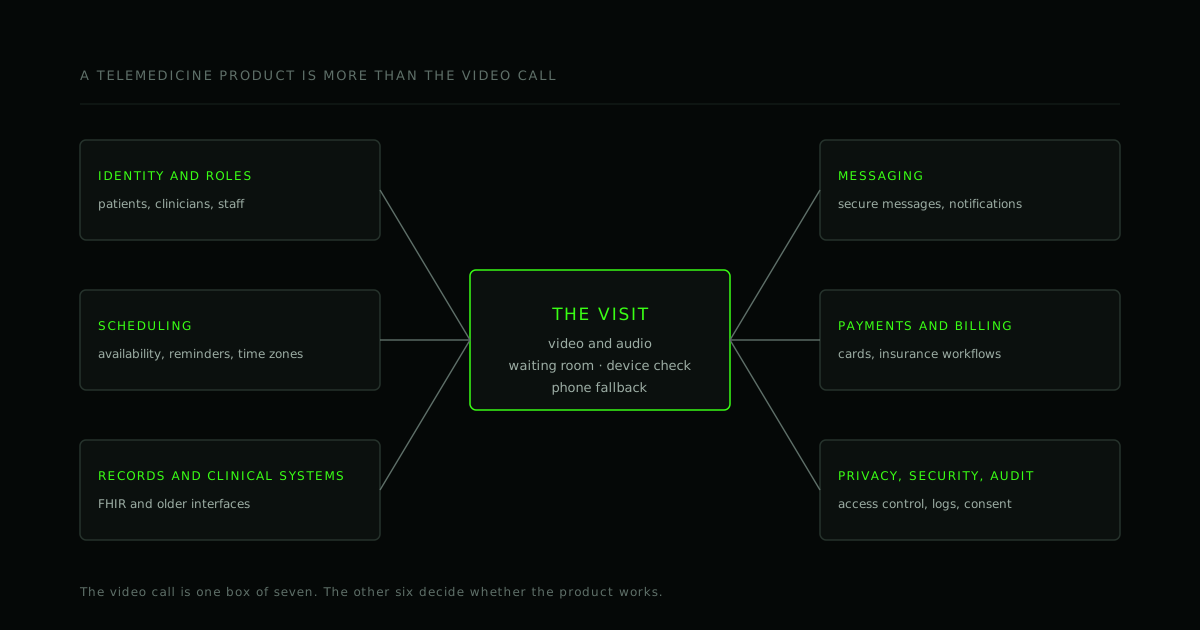
When people picture a telemedicine app, they picture the video call. It is the visible part, and today it is also one of the more solved parts. The product is everything around it: who is allowed in, how visits get booked, what the clinician sees, where the notes go, how the patient pays, and what happens when the connection fails at the worst moment.
This guide lists the pieces a telemedicine product needs, where the real effort tends to sit, and what to ask a development partner. It is engineering guidance, not legal or medical advice. The rules for health data and telehealth differ by country, region and type of service, so take advice on the ones that apply to you.
The building blocks
1. Identity and roles
Patients, clinicians, front-desk staff and administrators all need different views and permissions. Decide early how people prove who they are, whether a patient can join from a link without creating an account, and how clinicians are added and removed.
2. Scheduling and reminders
Availability, time zones, cancellations, rescheduling, waiting lists and reminders sound simple and are where a lot of the daily friction lives. No-shows are a real operational cost, so reminders are part of the product, not an extra.
3. The visit itself
Video and audio, plus the pieces that make a visit work in practice: a device and network check before joining, a waiting room, permission prompts that make sense, sharing a document or a screen, in-visit chat, and a fallback (usually audio-only, or a phone call) when video does not work.
4. Records and clinical systems
A visit produces notes, orders and follow-ups that usually belong in a system the clinic already uses. Plan the integration early. Many systems expose the HL7 FHIR standard for exchanging health data, older ones use older message formats, and coverage varies from one vendor to the next. Ask for sandbox access and the integration documentation before you commit to a schedule.
5. Messaging and notifications
Secure messages, reminders, follow-up instructions. Decide what may go by email or SMS and what must stay inside the app, since a message's content and its metadata can both be sensitive.
6. Payments and billing
Card payments, insurance workflows and receipts. Use a payment provider so card data never touches your servers, and keep insurance and claims logic scoped to what you truly need in the first release.
7. Prescriptions and other regulated functions
Some functions are regulated and are normally handled by integrating a licensed service instead of building it. Identify these at the start, because they change the schedule and the contracts.
8. Admin, reporting and support
A back office for scheduling, user management and reports, and support tools that let your team help a patient with a bad connection without seeing more health data than they need.
The video layer is where reliability is won or lost
Your users are not all on fast networks and new laptops. Patients join from older phones, mobile data, home Wi-Fi and, for some clinicians, hospital or corporate networks with strict firewalls. The failures that cause the most support calls are predictable:
- Connections that cannot be made directly. Some networks need a relay (a TURN server) to get media through (why WebRTC calls fail for some users, setting up coturn).
- Poor bandwidth. Video should degrade gracefully, and audio should survive when video does not. Test with throttled networks, not only the office connection.
- Permissions and devices. Camera and microphone prompts, Bluetooth headsets, and browsers that behave differently. Test on the real devices your users have.
- Group visits and interpreters. More than two participants means a media server (an SFU), not a mesh of direct connections (P2P, SFU or MCU).
- Accessibility. Patients include people who use screen readers, keyboards, captions and large text. A call screen that only works with a mouse excludes them (accessibility-aware development).
Privacy and security: what engineering can do, and what it cannot
Health data is among the most sensitive data a product can hold. The obligations depend on where you operate: in the US, HIPAA; in the EU and UK, data protection law that treats health data as a special category; and telehealth licensing rules that vary by place. The engineering work is largely the same:
- Encrypt data in transit and at rest.
- Collect and keep only what you need, and define how long, and how deletion works.
- Control access by role, and keep an audit log of who viewed or changed what.
- Keep health data out of logs, analytics and error reports.
- Session handling: timeouts, and secure sign-in.
- Backups and recovery, tested.
- Agreements with vendors that handle health data for you. In the US, that generally means business associate agreements.
- Consent flows for the visit, and for recording if you record.
- A plan for incidents, written before you need it.
Two cautions. First, compliance is a property of your whole organisation, including policies, contracts and training, not only of the software; we do not certify compliance, and no vendor's marketing sentence replaces that work. Second, ask what "encrypted" means. WebRTC media is encrypted in transit by default, but when a media server sits in the middle, it handles the media as part of forwarding it. End-to-end encryption through a media server needs extra design and has trade-offs. Ask each vendor, precisely, what they protect and from whom.
Build or buy the video layer
| Managed video platform | Self-hosted media server | |
|---|---|---|
| Speed to first release | Fast | Slower |
| Cost model | Usually per minute or per participant | Infrastructure and operations |
| Control over data location and behaviour | Limited to what the vendor offers | Full |
| Operational burden | The vendor's | Yours, or your partner's |
| Vendor agreements for health data | Needed with the vendor | Needed for your hosting |
Neither is always right. A managed platform can be the sensible start, and self-hosting (for example with an open-source server such as LiveKit) becomes attractive when volume, data-control requirements or per-minute costs justify it. Design the app so the video layer can be swapped later.
Integrating with the systems that already exist
The integrations decide the schedule more often than the features do. Map each one: the system, its owner, the data you need to read and write, the interface it offers, how you test against it, and who supports it. Assume the first one will take longer than expected.
Scoping the first release
Do not try to build the whole list. A first release might cover one specialty and one visit type, with manual back-office steps and a bought-in service for the regulated parts. Decide what you are trying to learn, as in MVP scoping, and keep the "never cut" items above in scope: privacy, security, the fallback when video fails, and the measurements you will need.
Questions to ask a development partner
- What have you built in this space, and what did the video reliability work involve?
- How do you handle users whose networks block direct connections?
- Which parts do you propose to build and which to buy, and why?
- How do you approach privacy, access control and audit logging?
- What do you need from us to integrate with our clinical systems, and when?
- What will you not promise about compliance?
- How will we see progress: can we join a real test call at each milestone?
- Who runs and monitors it after launch?
The same discipline applies to choosing any partner; see our buyer's checklist.
What we bring
We build real-time audio and video systems, including virtual clinic and tele-calling platforms, and we have worked with WebRTC since 2017. We build with privacy in mind, and we will tell you plainly what we can and cannot promise. We do not claim certification. If you are planning one, we can review the architecture with you before you spend on the build. See our healthcare software development page, or take a live demo call.
Frequently asked questions
How long does a telemedicine app take to build? It depends on the scope, and most of all on the integrations. See how to estimate the cost of an app for the method.
Do patients need to install an app? Not necessarily. A browser-based visit, joined from a link, removes a common barrier. A native app helps with notifications and repeat use. See how to choose a mobile framework.
Can we record visits? Technically, yes. Whether you should depends on the law, on consent and on how the recordings will be stored and protected. Treat recording as a product decision with legal input, not a checkbox.
Is a video call enough for a first version? Rarely: someone still has to schedule, remind, document and pay. A very small version can do those by hand while you learn.
Where to go from here
Start with the workflow, not the video window: who books, who joins, what gets recorded, where it goes, and what happens when it fails. Then pick the smallest release that tests it.
If you are planning a telemedicine product, send us the requirements: the users, the systems it must connect to and the deadline. We will reply with the questions we would ask before writing any code.
- #Custom software
- #Healthcare
- #Telemedicine
- #WebRTC
Working on this?
Planning a custom software project?
Send us the problem, the users and the deadline. We will reply with the questions we would ask before writing any code.