Flutter, React Native or Capacitor: how to choose
A decision guide, not a benchmark: what each framework actually is, the six questions that change the answer, when native or a PWA is the better call, and why a one-week spike beats any comparison table.
Cross-platform mobile development means one team and one codebase shipping to both iOS and Android. Three approaches cover most projects today: Flutter, React Native and Capacitor. Comparison posts usually end in a benchmark or a winner. This one does not, because the honest answer depends on things about your project that no chart can know.
We build with all three, and we do not have a house favourite. What follows is the way we would decide.
What each one actually is
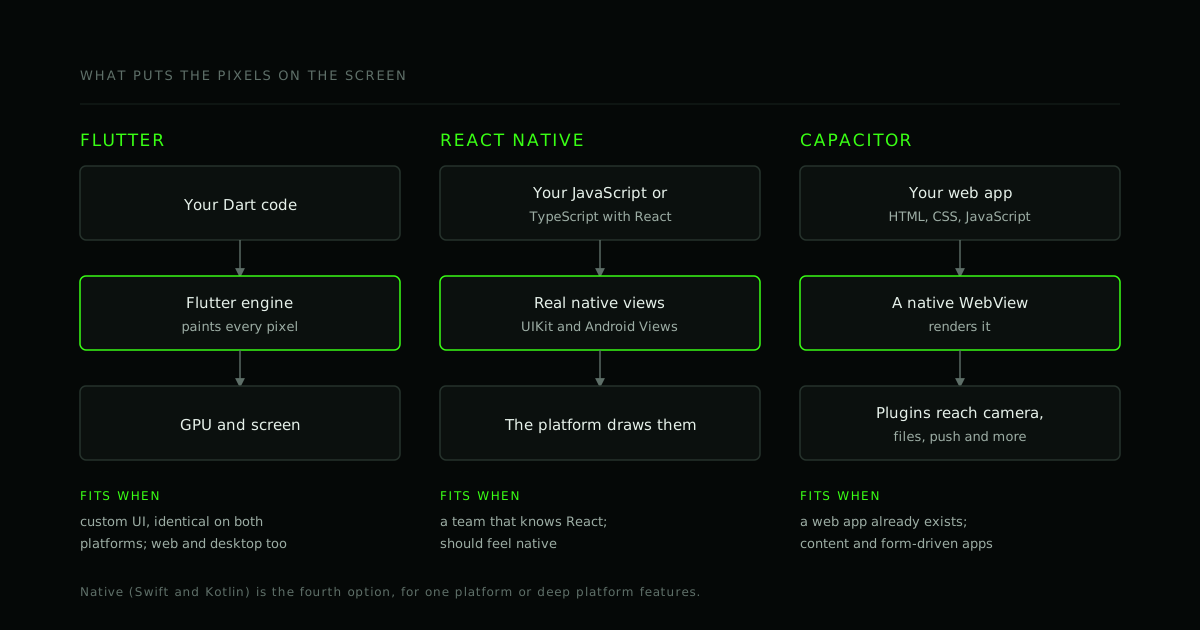
The three differ in one fundamental way: what puts pixels on the screen.
- Flutter is a UI toolkit from Google. You write Dart, and Flutter's own rendering engine paints every pixel itself instead of asking the platform to draw its buttons and lists. The result is a consistent look on both platforms and a lot of control over custom UI and animation. Flutter also targets web and desktop from the same code.
- React Native lets you write JavaScript or TypeScript with React. Your components become real native views, so the platform draws them. It fits teams that know React, and it feels native because the controls are the platform's own.
- Capacitor takes a web app (HTML, CSS and JavaScript, built with any web framework) and runs it inside a native WebView, with a plugin layer for the camera, files, push notifications and other device features. It is a web app in a store-shaped package.
Native development (Swift for iOS, Kotlin for Android) is the fourth option, and there are cases where it is the right one; see below.
Six questions that decide it
1. What does your team already know?
This is usually the strongest signal. A team fluent in React can be productive in React Native, or in Capacitor with a React web app, quickly. Far more developers know JavaScript than Dart, which affects hiring later. Dart is easy to pick up, but a new language and ecosystem is still a real cost if you are staffing from scratch.
2. Do you already have a web app?
If yes, Capacitor is the shortest route to the stores: the same UI, wrapped, with device features added. React Native can share business logic, API clients and state with a React web app, but the UI is rewritten with native components. Flutter means a new UI codebase (though it can share the backend).
3. How custom is the design?
A brand-specific look with rich animation, the same on iOS and Android, suits Flutter. An app that should follow each platform's conventions suits React Native. An app whose screens are forms, lists and content, and that is already designed for the web, suits Capacitor.
4. What do you need from the device?
Camera pipelines, Bluetooth Low Energy, background location, health data, payment terminals and vendor SDKs are where cross-platform projects meet reality. All three can call native code, so the question is not can they but how much native code will we end up writing, and is there a maintained plugin for it? Check the plugin for each critical feature before you commit, and read its open issues.
5. Where are the performance limits?
Most business apps run fine on any of them. The demanding cases are long, complex lists, heavy animation, on-device machine learning, real-time video, and low-end Android phones. A WebView-based app is the most exposed to weak devices. Do not trust a general benchmark for this; measure your own worst screen on a cheap Android phone and an older iPhone.
6. Who will maintain it, and for how long?
Frameworks, operating systems and third-party plugins all move on. Someone has to take upgrades, deprecations and store-policy changes for years. A codebase your team can read and change is worth more than a marginal speed difference on launch day.
If your situation is… lean toward…
| Your situation | Lean toward |
|---|---|
| Team of React developers, app should feel native | React Native |
| Existing web app to put in the stores quickly | Capacitor |
| Custom brand UI and animation, identical on both platforms | Flutter |
| Also want web and desktop from the same code | Flutter (or a shared web codebase with Capacitor) |
| Content and form-driven app, tight budget, web already built | Capacitor |
| Heavy use of one platform's newest features, or AR, watch or widget work | Native for that platform |
| No store distribution needed and few device features | A progressive web app |
Treat the table as a starting hypothesis, not a verdict.
Real-time video changes some of this
Calling features are where cross-platform frameworks diverge the most. Flutter and React Native reach WebRTC through native-backed plugins (the well-known ones are flutter_webrtc and react-native-webrtc), and several media-server SDKs, LiveKit among them, ship for both. In Capacitor the call runs in the WebView's own WebRTC, which behaves like the mobile browser's.
Whichever you pick, prove the call path on real iOS and Android devices in the first week: audio routing, Bluetooth headsets, backgrounding and permission prompts are where they differ. For the server side see P2P, SFU or MCU and WebSocket vs WebRTC.
Accessibility
All three can produce accessible apps, and none does it for you. Each maps its components to the platform's accessibility services (VoiceOver on iOS, TalkBack on Android) in its own way, so test with the real screen readers, not only the framework's tooling. For what that looks like in code, see accessibility-aware development and our write-up of a Flutter quantity widget with screen-reader semantics.
When not to go cross-platform
- You ship on one platform only. The main saving is gone, and native tooling is the most direct.
- The product is deep platform integration: advanced camera or audio work, AR, widgets, watch apps, or the newest OS features on day one.
- You need a website, not an app. A progressive web app avoids the stores. Check the current support for the exact features you need on iOS before choosing it.
One more caution about Capacitor: app stores expect more than a website in a wrapper, so add real native value (device features, offline behaviour), not just a shell.
The one-week spike
Comparison tables, including the one above, go stale. A short experiment does not.
- List the two or three things most likely to hurt: the riskiest screen, the trickiest device feature, the most important integration.
- Build exactly those in your top two candidates. Not a whole app.
- Run them on a low-end Android phone and an older iPhone.
- Note how the team felt: how fast they moved, how often they hit a missing plugin or a strange bug.
- Decide with evidence.
A week of a couple of engineers' time costs a small fraction of the wrong choice, and it turns a debate into a result.
Frequently asked questions
Is Flutter faster than React Native? It depends on the workload, the device and the code. Both run ordinary business apps smoothly. Differences show up in animation-heavy screens, graphics and startup, so measure your own screens on your own target devices.
Can we reuse our React web code in React Native? Logic, state management and API clients, largely yes. UI components, no: the web renders DOM elements and React Native renders native views.
Which is cheapest? The one that matches your team and your scope. The bigger lever on cost is almost always scope, not the framework. See how to estimate the cost of an app.
Can we switch later? The backend and APIs carry over. The app's UI layer mostly does not, so a switch is closer to a rewrite of the client. That is a good reason to run the spike now.
Is a Capacitor app a real native app? It is a real native app shell running a web UI, and it can be published in the stores. The feel of the UI is the web's, unless you design otherwise.
Where to go from here
If you would rather not decide alone, send us the problem, the users and the devices that matter. We will reply with the questions we would ask before recommending anything, and if a spike is the right next step, we will say so. Send requirements, or read our buyer's checklist for choosing a development partner. If you want to see how we write Flutter, the quantity_stepper package is open source.
- #Custom software
- #Mobile apps
- #Flutter
- #React Native
- #Capacitor
Working on this?
Planning a custom software project?
Send us the problem, the users and the deadline. We will reply with the questions we would ask before writing any code.