Setting up coturn: a TURN server that survives production
A complete, working coturn configuration for WebRTC — relay port ranges, time-limited credentials, TLS on 5349, the external-ip trap on cloud VMs, and the SSRF hardening almost every guide leaves out.
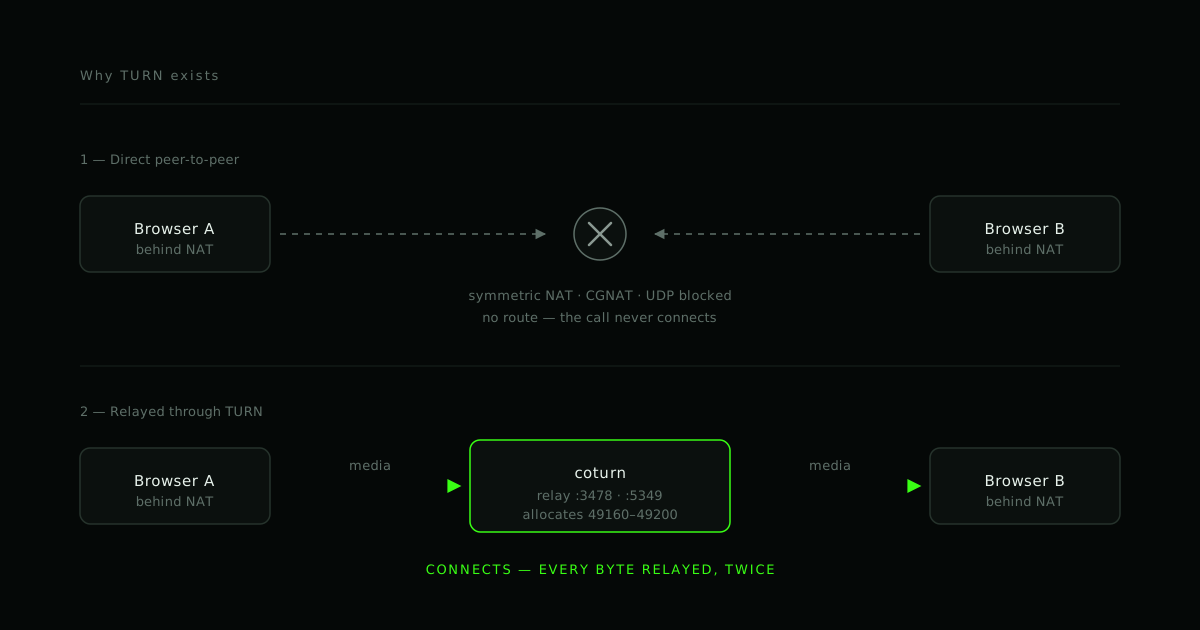
Most WebRTC projects discover TURN the hard way. The prototype works on the office wifi, the demo works from home, and then a real customer joins from a corporate network and gets a black rectangle and thirty seconds of silence.
This is the coturn setup we deploy. It is not the minimal config that "works" on a laptop — it is the one that holds up when the traffic is real.
What TURN is actually for
WebRTC tries direct connections first. Two peers exchange candidates and attempt, in rough order of preference:
- host — a direct route on the same network
- srflx (server-reflexive) — discovered via STUN, works through most home NATs
- relay — traffic forwarded through a TURN server
STUN is cheap and stateless: it tells a peer what its public address looks like from outside. That is enough for the majority of consumer networks. It is not enough for symmetric NAT, most corporate firewalls that block UDP outright, or carrier-grade NAT, where the mapping changes per destination and the address STUN reported is useless for anyone else.
For those, the only option is to give up on directness and relay. That is TURN, and it is why a TURN server is bandwidth-expensive in a way STUN never is: every relayed byte flows through your machine, twice.
Design consequence: budget TURN by relayed minutes, not by user count. Most calls will never touch it. The ones that do will consume real bandwidth for their entire duration.
Install
On Debian or Ubuntu:
sudo apt update
sudo apt install -y coturn
The package ships disabled. Enable the daemon:
# /etc/default/coturn
TURNSERVER_ENABLED=1
The configuration
Replace /etc/turnserver.conf with the following. Every line here earns its place;
the commentary explains why.
# --- Listening -------------------------------------------------------------
listening-port=3478
tls-listening-port=5349

# Bind explicitly. Leaving this unset makes coturn enumerate every interface,
# including ones you did not mean to expose.
listening-ip=10.0.0.5

# The address peers should be told to send relayed traffic to.
relay-ip=10.0.0.5

# --- The cloud VM trap -----------------------------------------------------
# On AWS, GCP, Azure, Hetzner and most VPS providers the machine only ever sees
# its private address. Without this line coturn advertises 10.0.0.5 as a relay
# candidate, every remote peer tries to reach a private address, and every
# relayed connection fails while your logs look completely healthy.
external-ip=203.0.113.10/10.0.0.5

# --- Relay port range ------------------------------------------------------
# Each concurrent relayed session consumes ports from this range. Open the exact
# same range on your firewall and security group.
min-port=49160
max-port=49200

# --- Authentication --------------------------------------------------------
# Time-limited credentials, generated by your application server. Do not ship
# static usernames and passwords to browsers: the credential is visible in
# devtools and your relay becomes someone else's free bandwidth.
use-auth-secret
static-auth-secret=REPLACE_WITH_A_LONG_RANDOM_SECRET
realm=turn.example.com

# --- TLS -------------------------------------------------------------------
# Port 5349 over TLS is what gets you through firewalls that only permit 443/TLS
# egress. Use a real certificate; browsers will not accept a self-signed one.
cert=/etc/letsencrypt/live/turn.example.com/fullchain.pem
pkey=/etc/letsencrypt/live/turn.example.com/privkey.pem

# --- Hardening -------------------------------------------------------------
# A TURN server forwards traffic to arbitrary addresses on request. Without the
# following it will happily relay into your own private network, which turns it
# into an SSRF pivot pointing at your metadata service and internal APIs.
no-multicast-peers
denied-peer-ip=0.0.0.0-0.255.255.255
denied-peer-ip=10.0.0.0-10.255.255.255
denied-peer-ip=100.64.0.0-100.127.255.255
denied-peer-ip=127.0.0.0-127.255.255.255
denied-peer-ip=169.254.0.0-169.254.255.255
denied-peer-ip=172.16.0.0-172.31.255.255
denied-peer-ip=192.168.0.0-192.168.255.255
denied-peer-ip=::1
denied-peer-ip=fc00::-fdff:ffff:ffff:ffff:ffff:ffff:ffff:ffff
denied-peer-ip=fe80::-febf:ffff:ffff:ffff:ffff:ffff:ffff:ffff

fingerprint
stale-nonce=600

# Disable the telnet CLI, or set a password on it. It is unauthenticated by
# default and listens on 127.0.0.1:5766.
no-cli

# --- Sanity ----------------------------------------------------------------
# Refuse to start rather than run wide open.
no-tcp-relay
user-quota=12
total-quota=1200
The denied-peer-ip block is the part that gets skipped. A TURN server is, by
design, a machine that connects to addresses it is told to connect to. On a cloud
VM, 169.254.169.254 is the instance metadata service. Deny the private ranges.
Time-limited credentials
use-auth-secret turns on the TURN REST API scheme. Your application server mints
short-lived credentials from the shared secret; coturn validates them without ever
having heard of the user.
The username is an expiry timestamp joined to any identifier you like. The password is the base64 HMAC-SHA1 of that username, keyed with the secret:
import crypto from 'node:crypto'

/**
 * Mint TURN credentials valid for `ttlSeconds`.
 * The secret must match `static-auth-secret` in turnserver.conf and must never
 * reach the browser.
 */
export function mintTurnCredentials(userId, ttlSeconds = 3600) {
  const expiry = Math.floor(Date.now() / 1000) + ttlSeconds
  const username = `${expiry}:${userId}`

  const credential = crypto
    .createHmac('sha1', process.env.TURN_STATIC_AUTH_SECRET)
    .update(username)
    .digest('base64')

  return {
    username,
    credential,
    urls: [
      'turn:turn.example.com:3478?transport=udp',
      'turn:turn.example.com:3478?transport=tcp',
      'turns:turn.example.com:5349?transport=tcp',
    ],
  }
}
Hand the result straight to the peer connection:
const res = await fetch('/api/turn')
const { urls, username, credential } = await res.json()

const pc = new RTCPeerConnection({
  iceServers: [
    { urls: 'stun:stun.cloudflare.com:3478' },
    { urls, username, credential },
  ],
})
Keep the TTL short — an hour is plenty. The credential only needs to outlive the call's ICE gathering, and a leaked one expires on its own.
Firewall
This is the second most common reason a "correctly configured" TURN server does nothing:
| Port | Protocol | Why |
|---|---|---|
| 3478 | UDP + TCP | STUN/TURN |
| 5349 | TCP | TURN over TLS, the firewall-friendly path |
| 49160–49200 | UDP | The relay range from min-port/max-port |
The relay range must match the config exactly. Open it on the host firewall and the cloud security group — they are separate, and forgetting the second is a classic afternoon lost.
Start it
sudo systemctl enable --now coturn
sudo systemctl status coturn
sudo journalctl -u coturn -f
Healthy startup logs the listening addresses and the relay range. If it reports
binding to 0.0.0.0 when you set listening-ip, your config file is not the one
being read — check that /etc/default/coturn is enabled and that no
--config override is set in the unit.
Prove it actually relays
Do not trust a green checkmark. Open Google's Trickle ICE tester, enter your TURN URL, username and credential, and gather candidates.
You are looking for a line whose type is relay. If you only see host and
srflx, TURN is not working — you are still relying on the direct path, and you
have simply not yet met a network that blocks it.
A faster check from the shell, shipped with coturn:
turnutils_uclient -v -t -T \
  -u "$(date +%s -d '+1 hour'):probe" \
  -w "$CREDENTIAL" \
  turn.example.com
What still goes wrong
- Only
srflx, neverrelay. Almost always the relay port range being closed on the security group, or credentials that expired before the test ran. - Works on UDP, fails on restrictive corporate networks. You need
turns:on 5349 with a valid certificate. UDP is frequently blocked outright. - Relay candidates carry a private IP. The
external-ipline is missing or wrong. This is the single most common cloud misconfiguration. - Bandwidth bill climbs unexpectedly. Static credentials leaked, or quotas
never set.
user-quotaandtotal-quotaexist for this.
Do you need to run this yourself?
Not always. Cloudflare, Twilio and others sell managed TURN, and for low volume the managed option is usually cheaper than a VM plus your attention. Self-hosting starts paying once relayed minutes are significant, or when the media path cannot leave infrastructure you control for compliance reasons.
The decision should be made on your actual relayed-minute numbers. If you do not have those yet, start managed, measure, and revisit.
We build and migrate real-time communication systems — WebRTC, LiveKit, mediasoup — on web, mobile and desktop. If your calls fail for a subset of users and you cannot reproduce it, that is a diagnosable problem, and usually this one.
- #TURN
- #coturn
- #WebRTC
- #NAT traversal
- #Infrastructure
Working on this?
We build and fix real-time systems.
If your calls fail for a subset of users and you can't reproduce it, that's diagnosable. Take a live demo call and we'll walk the architecture with you.