WebSocket vs WebRTC: different jobs, and most products need both
WebSocket carries messages between a client and your server; WebRTC carries live audio, video and data between peers. What each is for, where each breaks in production, and how they fit together in one call.
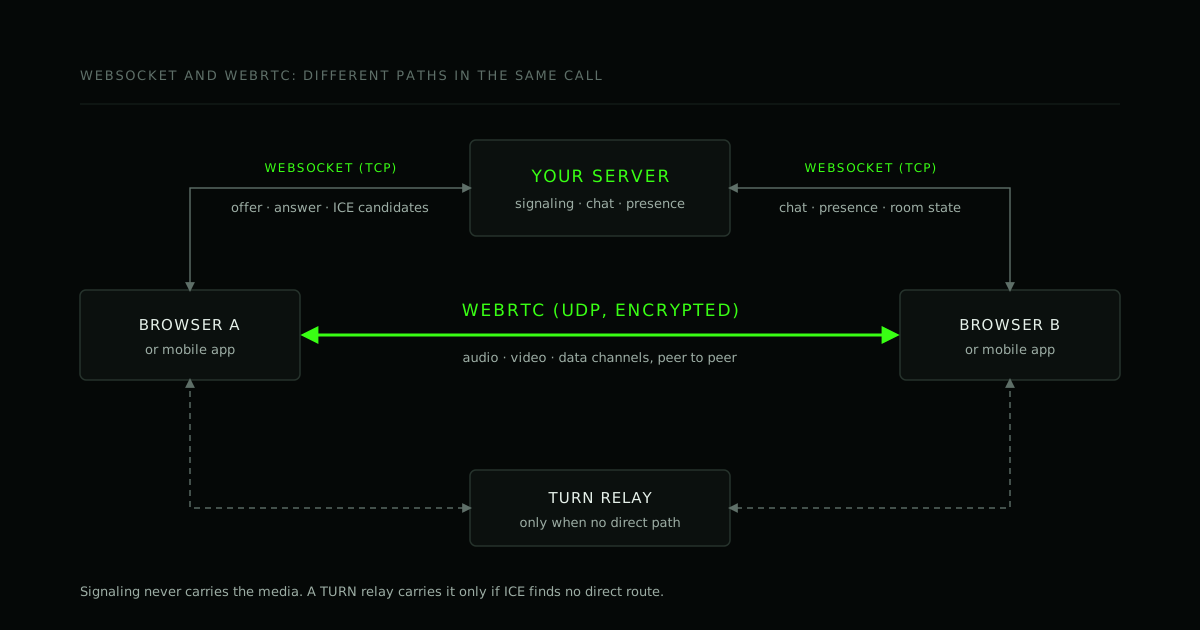
"WebSocket or WebRTC?" is usually asked as if one had to win. In a real product they sit side by side, because they answer different questions. WebSocket asks: how do a browser and my server keep talking to each other? WebRTC asks: how do two devices exchange live audio, video or data with the lowest delay the network allows?
This post separates the two, says which to reach for by job, lists what breaks in production for each, and shows the piece that joins them: signaling.
The short answer
| The job | Reach for |
|---|---|
| Chat, presence ("who is online"), notifications | WebSocket |
| Live dashboards, prices, collaborative cursors | WebSocket (or Server-Sent Events if data only flows server to client) |
| Audio or video calls, screen sharing | WebRTC |
| Fast, loss-tolerant data (game positions, cursor trails) | WebRTC data channel in unreliable mode, or WebTransport |
| Setting up any WebRTC connection | A WebSocket (or similar) for signaling |
The last row is the reason they are not rivals.
What a WebSocket is
A WebSocket (RFC 6455) starts as an ordinary HTTP request that asks the server to upgrade the connection. After that it is one long-lived, full-duplex TCP connection between a client and a server, carrying discrete messages in both directions.
Two properties matter:
- Every message goes through your server. That is a feature: you can authenticate, log, moderate, store and fan out messages to other clients.
- It is TCP. Delivery is reliable and ordered. A lost packet is retransmitted, and everything behind it waits. For messages that is exactly what you want. For live media it is the wrong trade.
Because it begins on the same ports as your website (80 and 443, in practice wss:// over 443), it passes through most corporate networks that let HTTPS out.
What WebRTC is
WebRTC is not one protocol. It is a bundle of APIs and protocols in the browser and in native SDKs:
- ICE, STUN and TURN find a route between two devices that are usually behind NATs and firewalls. Direct if possible, relayed through a TURN server if not.
- DTLS-SRTP encrypts media. WebRTC media is encrypted by design.
- RTP-based media transport over UDP, with congestion control, a jitter buffer, and codec handling, so a bad network degrades quality instead of freezing the call. Browsers also bring echo cancellation and noise suppression.
- Data channels (SCTP over DTLS) for arbitrary data, with per-channel choices about ordering and reliability.
That is a lot of machinery you would otherwise write yourself, and the reason "just send video over a WebSocket" is rarely a good idea. You would take on the network adaptation yourself, and TCP's retransmissions would show up as stalls rather than dropped frames.
The missing piece: signaling
Before two peers can connect they must exchange descriptions of what they can do (the offer and answer) and their candidate network addresses. WebRTC deliberately does not say how. You supply a signaling channel, and in practice that is very often a WebSocket, because the server needs to push messages to a client at any moment.
A trimmed sketch (no error handling, no glare handling):
const ws = new WebSocket('wss://example.com/signal');
const pc = new RTCPeerConnection({
  iceServers: [{ urls: 'stun:stun.example.com:3478' }],
});

// Local ICE candidates go to the other side through the WebSocket.
pc.onicecandidate = (e) => {
  if (e.candidate) ws.send(JSON.stringify({ type: 'candidate', candidate: e.candidate }));
};

ws.onmessage = async ({ data }) => {
  const msg = JSON.parse(data);
  if (msg.type === 'offer') {
    await pc.setRemoteDescription(msg.sdp);
    await pc.setLocalDescription(await pc.createAnswer());
    ws.send(JSON.stringify({ type: 'answer', sdp: pc.localDescription }));
  } else if (msg.type === 'candidate') {
    await pc.addIceCandidate(msg.candidate);
  }
};
Once the peer connection is up, the media flows peer to peer (or via a relay or media server) and never touches the WebSocket. The WebSocket carries the small control messages, and usually chat, presence and room state too.
Choosing by job
Chat, presence and notifications: WebSocket. You want history, moderation, read receipts and delivery to people who are offline, and all of that lives on your server anyway. A WebRTC data channel adds a peer connection to set up and no server-side record.
Calls and screen sharing: WebRTC. For more than a handful of participants, add a media server (an SFU) rather than a full mesh of peer connections; see P2P, SFU or MCU.
Loss-tolerant, latency-sensitive data: a data channel. A channel created with { ordered: false, maxRetransmits: 0 } behaves like UDP: a late or lost message is dropped, not resent. Good for positions that are stale a moment later. Two costs: you still need signaling and TURN, and peers can send you anything, so anything that must be trusted (scores, payments, permissions) still has to be validated by a server.
File transfer between two users: a data channel can work, and it saves your server the bandwidth. You then own chunking, progress, resumption and the case where the direct path fails.
One-way updates to browsers: consider Server-Sent Events. If data only flows from server to client, SSE is simpler than a WebSocket and reconnects on its own.
WebTransport is a newer option for low-latency client-server data over HTTP/3. Check current browser support for your audience before you depend on it.
What breaks in production
WebSocket
- Idle connections get cut by proxies and load balancers. Send an application-level heartbeat, and expect the connection to drop anyway.
- Reconnection is your job. Back off with jitter, and when the socket returns, resynchronise state (fetch what was missed) instead of assuming nothing happened.
function connect(url, onMessage) {
  let attempt = 0;
  const open = () => {
    const ws = new WebSocket(url);
    ws.onopen = () => { attempt = 0; };
    ws.onmessage = (e) => onMessage(JSON.parse(e.data));
    ws.onclose = () => {
      const delay = Math.min(30000, 500 * 2 ** attempt++) * (0.5 + Math.random() / 2);
      setTimeout(open, delay);
    };
  };
  open();
}
- Authentication is awkward from a browser. The browser WebSocket API cannot set an
Authorizationheader. Common answers are a cookie, or a short-lived token sent in the first message. Avoid long-lived tokens in the URL, which end up in logs. - Scaling means state. Two clients connected to different server instances need a shared channel (a pub/sub system) to reach each other, and a load balancer that keeps a connection on one instance.
- Backpressure. A slow client with a growing
bufferedAmountwill eat memory on the sender.
WebRTC
- Some users cannot connect directly, and only a TURN relay gets them through. It is the classic "works for me, fails for them" bug: why WebRTC calls fail for some users, and setting up coturn if you run your own.
- Networks change mid-call (Wi-Fi to mobile), which needs an ICE restart.
- Group calls do not scale as a mesh. Past a few participants you need an SFU.
- Devices and permissions differ. Audio routing, Bluetooth headsets, background tabs and permission prompts vary by browser and OS, so test on real devices.
Using both in one call
A typical call uses both, each for what it is good at:
- The client opens a WebSocket to your server and joins a room.
- Through it, the two sides exchange offer, answer and ICE candidates.
- WebRTC connects (directly, or through TURN or a media server) and audio and video flow.
- The WebSocket stays open for room state: who joined, who muted, chat, hand raises.
Chat during a call can go either way. Use the WebSocket when you want history and moderation; use a data channel when messages are ephemeral and you would rather not load your server.
Frequently asked questions
Is WebRTC faster than WebSocket? For live media, yes: it runs over UDP and adapts to loss instead of stalling. For messages between a client and your server it is the wrong tool, and "faster" depends on what you measure.
Can WebRTC replace WebSocket? No. You need signaling to set it up, and in most products a server-side channel for state, chat and moderation.
Can I send video over a WebSocket? Technically. You would be rebuilding jitter buffering, congestion control and echo handling, over a transport whose retransmissions cause freezes. Use WebRTC.
Do WebRTC data channels work without a server? Not entirely. You still need signaling, STUN, and a TURN server for the users who cannot connect directly.
Which should I learn first? WebSocket. It is small, and you will use it for the signaling that WebRTC needs.
Where to go from here
If you are choosing between them, the useful question is not which is better but which parts of your product are messages (WebSocket) and which are live media or fast data (WebRTC). Most products have both.
We build and fix real-time systems: video calling, live streaming and the signaling behind them. If your calls fail for some users and you cannot reproduce it, or you are planning one and want the architecture checked first, take a demo call or send us the requirements.
- #WebRTC
- #WebSocket
- #Real-time
- #Architecture
Working on this?
We build and fix real-time systems.
If your calls fail for a subset of users and you can't reproduce it, that's diagnosable. Take a live demo call and we'll walk the architecture with you.