Desktop app development: Electron, Tauri, native or a web app?
How to choose a stack for a desktop app: what Electron, Tauri, native toolkits and a plain web app each cost you, the security and packaging work every option needs, and the questions that decide it.
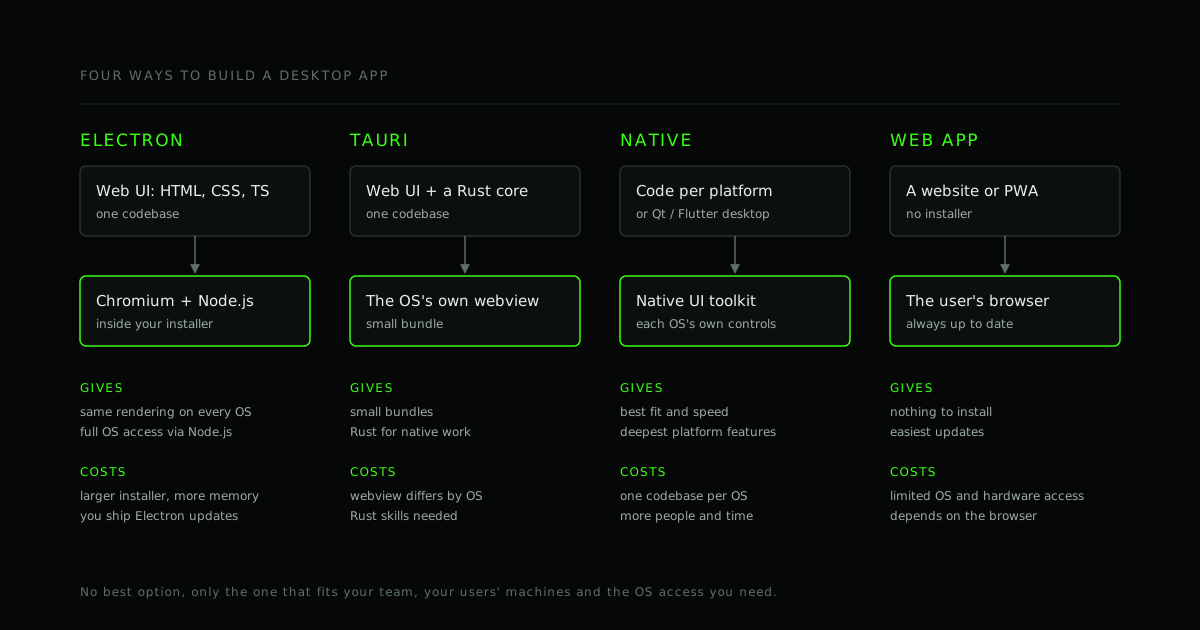
Most software does not need to be a desktop app. A website is easier to build, to update and to reach. A desktop app earns its place when the product needs something a browser will not give it: files on disk, work that continues offline or in the background, hardware, deep integration with the operating system, or installation on managed company machines.
If that describes your product, the question becomes how to build it. This is the way we would decide, and the work that every option needs whichever you choose.
Four ways to build one
Electron
Electron packages a web app together with a copy of Chromium and Node.js. You write the interface in HTML, CSS and JavaScript or TypeScript, and the same code runs on Windows, macOS and Linux. Visual Studio Code and Slack are built with it.
- Gives you: identical rendering on every platform (you ship the browser engine), the whole web ecosystem, and full access to the operating system through Node.js.
- Costs you: a larger installer and more memory than a lean native app, because every app carries a browser. You are also responsible for shipping new Electron versions, since that is how the bundled Chromium gets its security fixes.
Tauri
Tauri also builds the interface with web technology, but uses the operating system's own webview instead of shipping a browser, and puts the native side in Rust.
- Gives you: small bundles, and a Rust core for the work that needs to be fast or close to the system.
- Costs you: the webview is not the same everywhere (it varies by operating system and version), so you test the interface on each. Someone on the team needs Rust for anything native.
Native toolkits
A separate app per platform, using each platform's own tools: for example Swift on macOS, and .NET or WinUI on Windows. Cross-platform native toolkits such as Qt or Flutter's desktop support sit in between: one codebase, a non-web UI.
- Gives you: the best fit with each platform, the best performance for demanding work, and the deepest access to platform features.
- Costs you: more people and more time when you target more than one platform, and skills that a web team may not have.
A web app (or a PWA)
- Gives you: nothing to install, updates that are instant, and the widest reach.
- Costs you: limited access to the operating system and to hardware, and behaviour that depends on the user's browser. Check the exact features you need before you decide it will do.
Five questions that decide it
- What does your team already know? A web team is productive in Electron or Tauri quickly. A team with native experience on one platform is productive there.
- How deep is the operating system integration? Tray icons, global shortcuts, file associations and background services are all possible in Electron and Tauri. Kernel-level, driver-level or very platform-specific work points to native.
- What is the install and memory budget? For a tool running on modest hardware, or one that sits open all day next to many others, footprint matters. Measure it on your target machines.
- Should it look native or consistent? Native toolkits look like the platform. Web-based ones look like your product on every platform, which is often exactly what a brand wants.
- How will it be deployed and updated? A consumer app can update itself. A managed environment may require installer formats and an update process that IT controls.
If you are unsure, the same advice we give for mobile applies: build the riskiest slice in your top two candidates and measure it (how we approach that for mobile).
The work every option needs
The framework choice is the visible part. These are the parts that take the time, and that plans often leave out:
- Code signing. Windows and macOS warn about, or refuse to open, software that is not signed. On macOS, distributing outside the App Store also requires notarization.
- Installers and packaging for each platform (for example MSI or MSIX on Windows, DMG or PKG on macOS, and AppImage, deb or rpm on Linux).
- Updates. How the app finds and installs new versions, how a bad release is rolled back, and how you handle users who stay on old versions for a long time.
- Crash and error reporting, so you hear about problems you cannot reproduce.
- Local data. Where settings and files live, how they are backed up, and how a new version migrates the old data.
- Permissions and privacy: what the app reads, and what it tells users about it.
- Accessibility. Desktop screen readers differ by platform: JAWS, NVDA and Narrator on Windows, VoiceOver on macOS. Test with the real ones (accessibility-aware development, what an audit covers).
Electron security: the short list
An Electron app is a browser with the keys to the computer, which makes a few defaults matter a great deal. The official Electron security checklist covers them in full. The essentials:
- Keep context isolation on and Node.js integration off in windows that show web content, and enable the sandbox. Current versions default to safe values, but set them explicitly and do not override them.
- Expose a narrow API from a preload script instead of giving the page general access.
- Validate messages that cross from the page to the main process, and check who sent them.
- Load only content you control, or content you have deliberately decided to trust, and set a Content Security Policy.
- Keep Electron up to date.
const win = new BrowserWindow({
  webPreferences: {
    contextIsolation: true,
    nodeIntegration: false,
    sandbox: true,
    preload: path.join(__dirname, 'preload.js'),
  },
});
// preload.js: expose one narrow function, not ipcRenderer itself
const { contextBridge, ipcRenderer } = require('electron');

contextBridge.exposeInMainWorld('app', {
  saveReport: (data) => ipcRenderer.invoke('report:save', data),
});
On the main-process side, the handler for report:save should check its input before it touches the disk, exactly as an API endpoint would.
Real-time features on the desktop
If the app has calls or screen sharing, Electron is a comfortable choice: it includes Chromium, so WebRTC behaves as it does in the browser, and Electron provides an API for choosing a screen or window to capture. The server-side design is the same as for the web; see WebSocket vs WebRTC and P2P, SFU or MCU.
What we build with
We build desktop apps with Electron, and we will say so when something else fits better: a small, resource-sensitive utility, or work that needs deep platform integration, is better served natively. If you would like a second opinion on a plan, send us the requirements, or see our desktop app development page.
Frequently asked questions
Is Electron a bad choice because apps are large? It is a trade, not a flaw. You give up some size and memory and get one codebase, consistent behaviour and a large ecosystem. Whether that is worth it depends on your users' machines and your team.
Is Tauri better than Electron? It is smaller and uses Rust. It also relies on each operating system's webview, so behaviour differs more between platforms. The right one depends on your team's skills and how much rendering consistency matters.
Can we start as a web app and add a desktop shell later? Often, yes, which makes it a reasonable first step. Design the web app with that in mind, and check the operating system features you will need.
How much does a desktop app cost? The same rule as for any app: it follows the scope. See how to estimate the cost of an app. Signing, packaging and updates belong in the estimate.
Do desktop apps need to be accessible too? Yes. Desktop platforms have their own accessibility services, and the same user needs apply. Build to them from the start.
Where to go from here
Decide from the constraints, not the trend: the team you have, the operating system access you need, the machines your users run, and how the app will be installed and updated. Then test the riskiest part in your leading candidates before committing the whole budget.
- #Custom software
- #Desktop apps
- #Electron
- #Architecture
Working on this?
Planning a custom software project?
Send us the problem, the users and the deadline. We will reply with the questions we would ask before writing any code.