What an accessibility audit includes and how to buy one
Automated scans find some problems and people find the rest. What a real audit against WCAG 2.2 AA covers, what the report should contain, the questions to ask a provider, and the red flags, including overlay widgets.
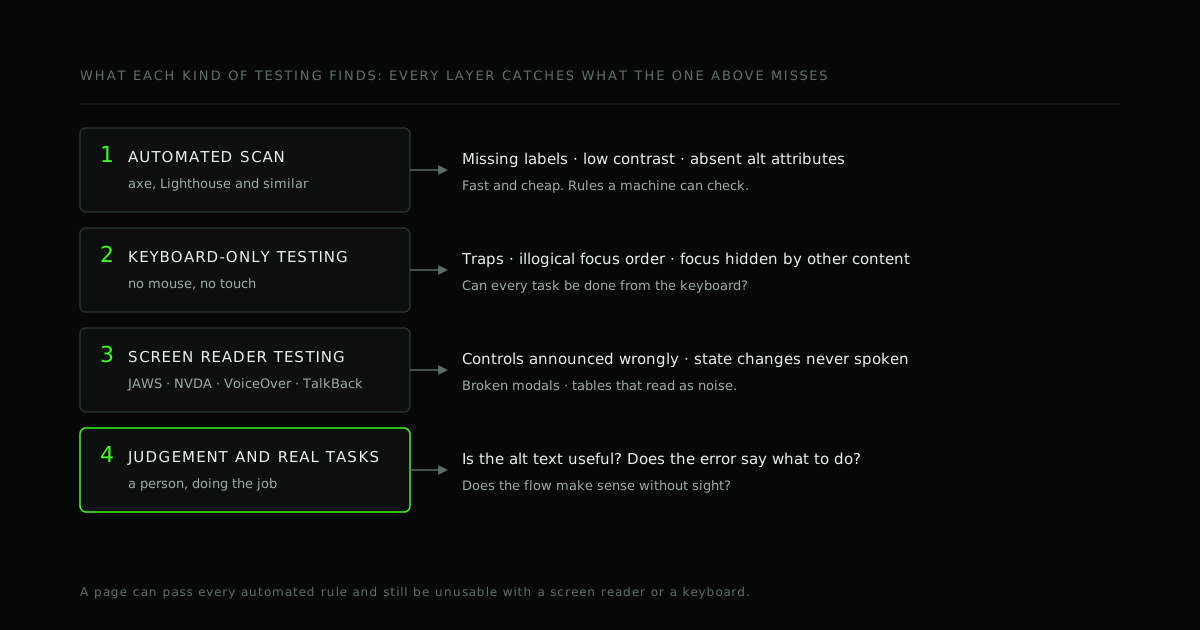
"We need an accessibility audit" can mean five different things, and the price of the cheapest and the dearest can differ a lot. The difference is not the logo on the report. It is who tested what, with which tools, and how specific the findings are.
This post explains what an audit against WCAG 2.2 level AA should include, what the report should look like, what to ask a provider, and what to walk away from. It is written for the person who has to buy the audit, not the one who will fix the code.
This is engineering guidance, not legal advice. Laws differ by country and by the kind of organisation you are.
Audit, scan, overlay, conformance report: they are not the same thing
- Automated scan. A tool such as axe or Lighthouse checks a page against rules it can test by machine. It is fast, cheap and worth running, but it finds only a subset of problems, because most of accessibility needs judgement.
- Audit. People evaluate a defined set of pages and flows against a standard (usually WCAG 2.2 level AA), using automated tools plus manual testing, keyboard testing and real assistive technology. The output is a list of specific defects with fixes.
- Accessibility conformance report (ACR). A document that describes how a product meets a standard, often written on the VPAT template. It can only be as good as the testing behind it.
- Overlay or "accessibility widget". A script that claims to fix accessibility automatically. In January 2025 the US Federal Trade Commission announced a $1 million order against one such vendor over claims that its tool could make any website WCAG-compliant. A widget is not an audit, and it does not fix the underlying code.
One more fact worth knowing: there is no such thing as a "WCAG certificate" issued by W3C. Conformance is claimed by whoever owns the content, and it is only as credible as the evidence behind it.
What a real audit covers
1. Scope and sampling
No one audits every page of a large product. The provider and you agree on a representative sample: the main templates, the key journeys (sign-up, checkout, booking, account, support) and the components that repeat. A clear scope statement says what was tested and, just as importantly, what was not.
2. An automated pass
Tools run first because they are quick and catch the mechanical problems: missing form labels, absent alt attributes, low colour contrast, duplicate IDs, invalid ARIA. Anything found here is a bonus; the rest of the audit is where the value is.
3. Keyboard-only testing
Can you do everything without a mouse? The tester checks reachability, a sensible focus order, a visible focus indicator, no keyboard traps, and that focus is not hidden behind sticky headers or dialogs. WCAG 2.2 added criteria in this area, such as focus not being obscured.
4. Screen reader testing
This is the layer scans cannot replace. The tester uses the assistive technology that people actually use. In WebAIM's tenth screen reader user survey (December 2023 to January 2024), JAWS and NVDA were the two most-used desktop screen readers among respondents, with VoiceOver and, on Android, TalkBack, covering Apple and Android devices. A good audit names which combinations it used. See how we approach it in testing with NVDA and testing with JAWS.
What this catches: a button announced as "clickable" instead of "Mute, toggle button", a status change that is never spoken, a modal that does not trap or restore focus, a table that reads as noise.
5. Visual and interaction checks
- Zoom and reflow: the page should stay usable at high zoom and on a narrow viewport without two-dimensional scrolling.
- Contrast for text and for interface components.
- Target size: WCAG 2.2 adds a minimum pointer target of 24 by 24 CSS pixels, with exceptions (success criterion 2.5.8).
- Motion and animation, and whether it can be stopped.
- Orientation, text spacing and text resizing.
6. Forms, errors and content
Labels and instructions, error messages that say what went wrong and how to fix it, no reliance on colour alone, headings and landmarks that make the page navigable, meaningful link text, alt text that describes purpose rather than appearance, captions and transcripts for media, and the page language.
7. Mobile apps
For native and cross-platform apps the same ideas apply through different APIs: accessible names and roles, support for larger text sizes, target sizes, orientation, and screen reader behaviour on real iOS and Android devices. If your app is built with Flutter, React Native or Capacitor, see how to choose a framework; the choice affects how the accessibility tree is built.
8. Judgement
Some checks are about meaning, and only a person can do them: is this alt text actually useful, does the error message help, is the order of information logical, would someone using only speech understand what happened after they pressed the button? This is why an automated report alone is not an audit.
What the report should contain
A report is only useful if a developer can act on it without a meeting. Look for:
- A summary that a non-specialist can read: overall findings, the biggest risks, and where to start.
- Method and scope: the pages and flows tested, the date, the browsers, devices and assistive technology used (with versions).
- For every issue: what is wrong, where it is (a URL or screen and steps to reproduce), which WCAG success criterion it relates to, who it affects and how badly, how to fix it, and evidence such as a screenshot or a recording of what the screen reader said.
- Prioritisation by impact on users and effort to fix, not an alphabetical list.
- What was not tested, stated plainly.
- A retest after fixes, included or clearly priced.
If the report is a raw export from a scanner with a cover page, you bought a scan.
Questions to ask a provider
- Which pages and flows will you test, and how do we agree the sample?
- Which tools do you use, and what do you test by hand?
- Which screen readers and browsers do you test with, and on which devices?
- Who does the testing, and are people who use assistive technology involved?
- What will each finding include? May I see an anonymised sample report?
- Is a retest after remediation included?
- Will you help fix the issues, or only report them?
- How do you deal with things you cannot decide (for example, a design conflict)?
- What will you not promise?
The last question is the best filter. A trustworthy provider will not promise legal immunity or "100% compliance".
Red flags
- A guarantee of compliance, or of protection from complaints or lawsuits. No one can promise that.
- A price that is far below the rest, for what turns out to be an automated scan.
- An overlay or widget sold as the solution.
- No named assistive technology, or no manual testing.
- A report with no fix guidance, or with no way to reproduce each issue.
- "Certified" language with nothing behind it.
After the audit: fixing in a sensible order
- Start with the blockers on your core journeys: the issues that stop someone signing up, paying or getting help.
- Fix at the component level. If the date picker is broken, fixing it in your design system repairs every screen that uses it.
- Add automated checks to your build. Machines are good at regression: they will not find everything, but they catch things that used to be fine.
- Teach the team what the findings mean, so the same mistake is not made in the next feature. Accessibility is far cheaper to build in than to bolt on (accessibility-aware development).
- Retest, and keep a record of what you did.
Why organisations buy audits now
Standards and regulations give the context, and they vary. The European Accessibility Act, for example, has applied since June 2025 to many consumer-facing products and services in the EU (European Commission). In the US, accessibility claims against websites and apps are made under disability law, and public bodies face specific rules. Ask a lawyer what applies to you. What an audit gives you either way is an accurate picture of where real people get stuck.
How we work
We build to WCAG 2.2 AA and test with the screen readers people use: JAWS and NVDA on Windows and VoiceOver on Apple devices. When we audit an existing product, we test it against real assistive technology and not only automated scans, we fix in priority order, and we leave your team able to re-test. We do not claim certification, and we will not promise compliance; we describe what we tested and what we found.
Frequently asked questions
How long does an accessibility audit take? It depends on the scope: the number of templates, flows and platforms. Ask for a timeline based on the agreed sample, not a fixed answer.
Can we do it ourselves? You can and should run the automated checks and keyboard tests in-house. Screen reader testing benefits from practice, and an outside audit also gives you a neutral list.
Do we need to audit again after fixing? You need to retest what you fixed. After big changes, test the changed parts again.
Is passing an automated scan enough? No. A page can pass every automated rule and still be unusable with a screen reader or a keyboard.
Does an overlay make us compliant? No. The regulator's action described above concerned exactly that kind of claim. Fix the source.
Where to go from here
If your product has never been through a screen reader, that is the place to start. Send us the product and the platforms that matter, and we will reply with the questions we would ask before scoping an audit. You can also read what we mean by accessibility-aware development.
- #Accessibility
- #WCAG
- #Audit
- #Screen readers
Working on this?
We build accessible products and audit existing ones.
If your product has never been through a screen reader, that is the place to start. We test against JAWS, NVDA and VoiceOver, fix in priority order, and leave your team able to check it stays fixed.